Fluency.ai
A full on-device voice pipeline — speak in English, get a spoken reply back. No internet, no accounts, no cloud.
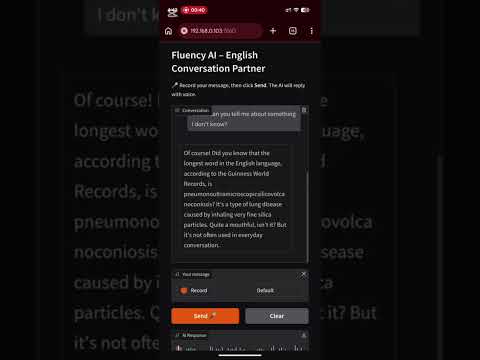
A conversation, entirely offline
Fluency AI is a voice conversation app: talk to it in English, and it listens, thinks, and talks back — entirely on your own computer, with no internet connection required after setup.
It chains three local models into one pipeline — Moonshine for speech-to-text, Mistral 7B for the reply, and Kokoro for text-to-speech — served over a self-signed HTTPS Gradio app so it's reachable from a phone on the same Wi-Fi, not just the machine it runs on.
What it does
- Click the mic, speak in English, get a spoken and written reply back
- Conversation history stays in the chat panel until cleared
- Speech recognition, LLM reasoning, and voice synthesis all run locally
- No accounts, no API keys, no cloud calls — nothing leaves the computer
- Self-signed HTTPS server, reachable from a phone or tablet on the same Wi-Fi
- Just open the PC's local IP on port 7860 from any device
- Moonshine handles speech-to-text, Mistral 7B (via Ollama) the reply, Kokoro the voice
- All three models run on CPU via ONNX — no GPU required
The pipeline, step by step
You speak — the browser records audio through the microphone.
Moonshine (STT) transcribes the audio to text, running on CPU via ONNX through FastRTC.
The transcript goes to Mistral 7B Instruct via a local Ollama server, which generates a conversational reply.
Kokoro (TTS) converts the reply text to natural-sounding speech, again on CPU via ONNX.
The browser plays the audio and shows the text reply — the whole round trip happens without an internet connection.
All local, by design. Moonshine, Mistral 7B, and Kokoro all run on the machine itself. The Gradio server uses a self-signed HTTPS certificate specifically so microphone access works from other devices — phones, tablets — on the same network.
Tech Stack
Check out the code
Full source, setup instructions, and architecture notes are on GitHub.